Fill the gaps in your diary by posting them to your Stories
An empty slot never comes back. Often there are people who would book, they just don't know a time opened up. Here is how to let them know quickly, every day, without spending time designing a post.
Create a free accountAn empty chair on a Tuesday afternoon
Tuesday, 2pm. The barbershop is quiet, the barber is scrolling on his phone and there are three gaps before 6pm. Meanwhile, one of your regulars is thinking "I need a tidy-up this week" without knowing there was a slot today.
People who follow the shop on Instagram check Stories several times a day. A post saying "today: 2pm, 3pm, 4:30pm" with a link to book is the nudge a guy needs to fit a haircut into his lunch break or on his way home.
The problem is that designing a post every day is a chore, so nobody does it. When the image comes ready-made from the diary, posting takes a minute.
How to share free slots (with or without software)
Sharing free slots works when it becomes a habit: at the same time, in the same format, with an easy way to book right after seeing it.
Check the diary early
First thing in the morning, see which times are still free. The sooner you share them, the more time people have to rearrange their day and book.
Show the times, not just "slots available"
"Slots available today" gets questions. "Today: 10am, 2:30pm and 5pm" gets bookings. When people see the exact time, they know straight away whether it fits.
Use a format people recognise
Same colours, same logo, same wording. Over time, your followers glance at your Story and know it is the day's list of free slots.
Always include the way to book
Every post needs to say how to book: a booking link or a number to message. Without it, interest fades before it turns into a booking.
Post where your clients already look
Instagram Stories, WhatsApp status and groups of existing clients. Those are the places people see the message without having to look for it.
How it works in My Zeit
In My Zeit, the image with your free times comes ready-made from the diary itself. No designing and no typing times: you choose the day and share.
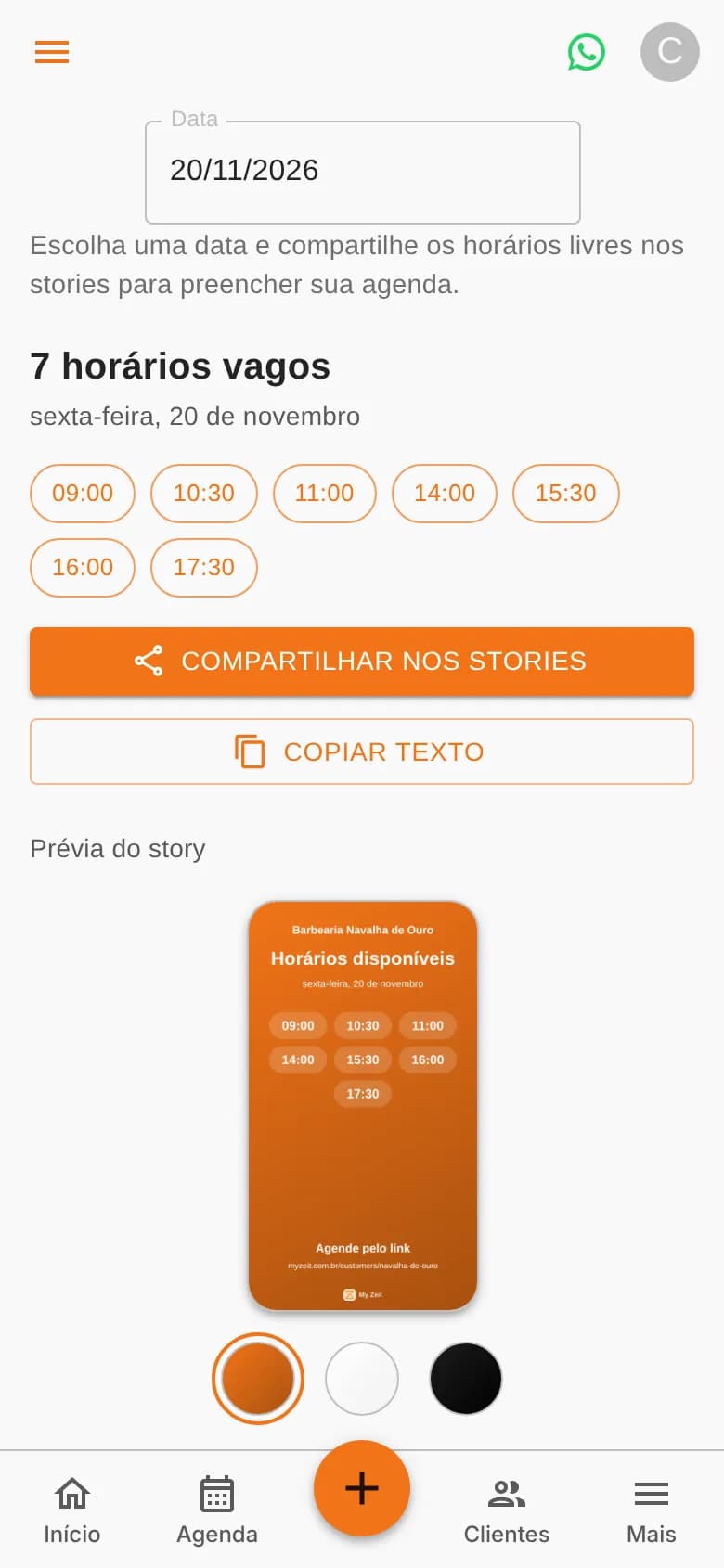
Open "Promote free slots" from the diary
In the diary, tap "Promote free slots". Today's date is selected by default, but you can pick another one. Then choose the image background: your brand colour, white or black.
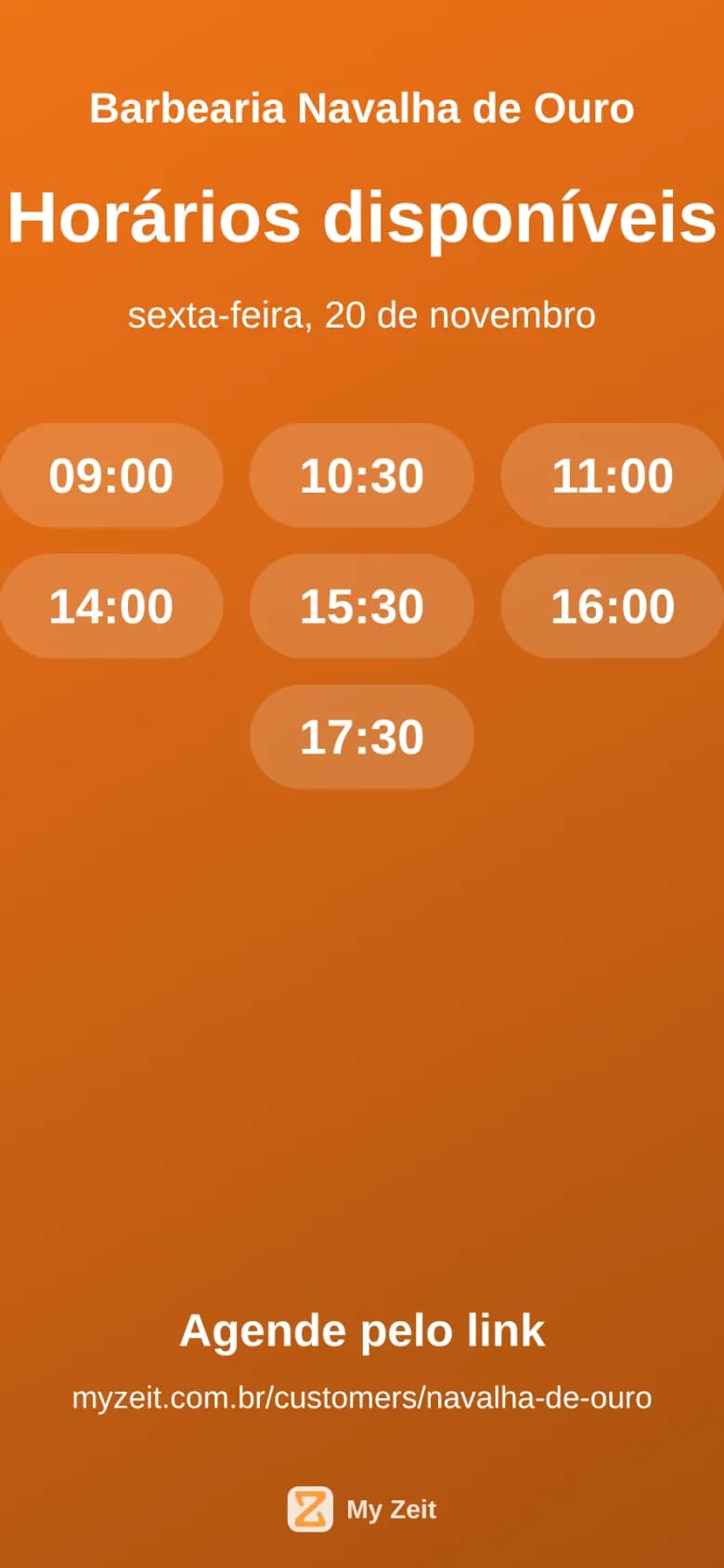
The image is ready in Story format
The system builds a vertical image with the logo and name of the barbershop, the date, the free times (up to 12 are shown, the rest appear as "+N") and the booking link. A small platform logo sits in the corner. You share it through your phone's share menu to Stories, WhatsApp status or anywhere else, or download it. You can also just copy a text with the times.
Frequently asked questions
Can I share one barber's free slots only?
The image shows the barbershop's free times for the chosen date. Whoever taps the booking link picks the barber and the time on the page.
Is it worth posting every day?
Yes, if there are gaps. Posting at the same time each morning gets clients used to checking the shop's Stories when they need a cut.
Is the image posted straight to my Instagram?
No. You use your phone's own share menu and choose where it goes: Instagram Stories, WhatsApp status, a chat or another app. You can also download the image.
How many times fit in the image?
Up to 12 times are shown. If there are more free slots, the image shows "+N" to say how many more are left.
Can I share free slots for another day?
Yes. The screen opens on today, but you can choose any date. You could post tomorrow's free slots the night before, for example.
What if I only want to send text?
Use the copy text option. It copies the free times so you can paste them into a message or a group.
See also
Stop booking appointments over WhatsApp one by one
Your own booking page where the client picks the service, the barber and a free time, 24 hours a day.
Get found by people looking for barbershops near them
Show up in the search, on the map and on city pages for people looking for barbershops, with no listing fee.
Turn free slots into booked ones
Create your account, set up your diary and post the image with your free times today.
Create a free account